


Background
As a UX Engineer, we are positioned directly within the design team structure to collaborate closely with designers every day. This closeness previously succeeded in giving birth to the mature and widely adopted BLUE Web Design System across all tribes, even achieving a score of 8.48 in reducing redundancy and 8.42 in accelerating delivery in a satisfaction survey in mid-2024.
However, the condition of the mobile design system was very different because its development was carried out by a developer team outside the design team structure, which was more focused on feature development. Consequently, the mobile design system lagged behind the web and still used the old standard (BLUE 2.0), with a design language that was not uniform between the Customer and Seller ecosystems. In fact, more than 85% of Blibli users access the application through mobile devices.
Based on this condition, we initiated the development of the BLUE Android Design System to align visual and technical standards across the Blibli application ecosystem through collaboration between UX Engineers, designers, and Android developers.
Problem Identification
Based on this background, several main problems that were identified are as follows:
-
The mobile design system lagged behind the web
because it did not yet have focused management. - The use of the old design standard (BLUE 2.0) caused inconsistencies in the design language across platforms and services.
- The fragmented maintenance process created redundancy and hindered team work efficiency.
- The absence of a single standard on the mobile platform caused inconsistent user experience quality.
Goals and Objectives
The main goal of this project is to build the BLUE Android Design System as a single standard that aligns the design language and technical implementation across the Blibli application ecosystem.
To achieve this goal, several main objectives were established as follows:
- Equalize the quality of the mobile design system with the web by strengthening cross-role collaboration (UX Engineer, designer, and Android developer).
- Unify the Customer and Seller ecosystems into the BLUE 3.0 standard to replace the old standard (BLUE 2.0).
- Build a centralized design system as a Single Source of Truth (SSOT) to reduce redundancy and maintenance process fragmentation.
- Align the design language across platforms to ensure a consistent user experience throughout the Blibli application ecosystem.
Roles and Responsibilities
In this project, I acted as part of the UX Engineer team collaborating directly with designers and Android developers.
The responsibilities included:
- Developing reusable, scalable, and consistently implemented BLUE Android components.
- Structuring the foundation of design tokens such as colors, typography, sizing, opacity, and elevation to maintain visual consistency.
- Developing an icon library to reduce asset redundancy and maintain visual consistency.
- Ensuring the quality and consistency of the design system through technical documentation, code review, testing, and regular evaluations.
- Supporting cross-platform design system synchronization to ensure a consistent user experience across the Blibli application ecosystem.
Process and Execution
This project was carried out through several main phases to ensure the design system was built structurally, aligning design needs with technical implementation.
1. Learning and Technical Adaptation
As a UX Engineer previously focused on web development, we were required to adapt to Android development through an explorative and iterative approach.
- Utilizing the official Android Developers curriculum as the main foundation, covering Android View (XML), Jetpack Compose, up to interoperability.
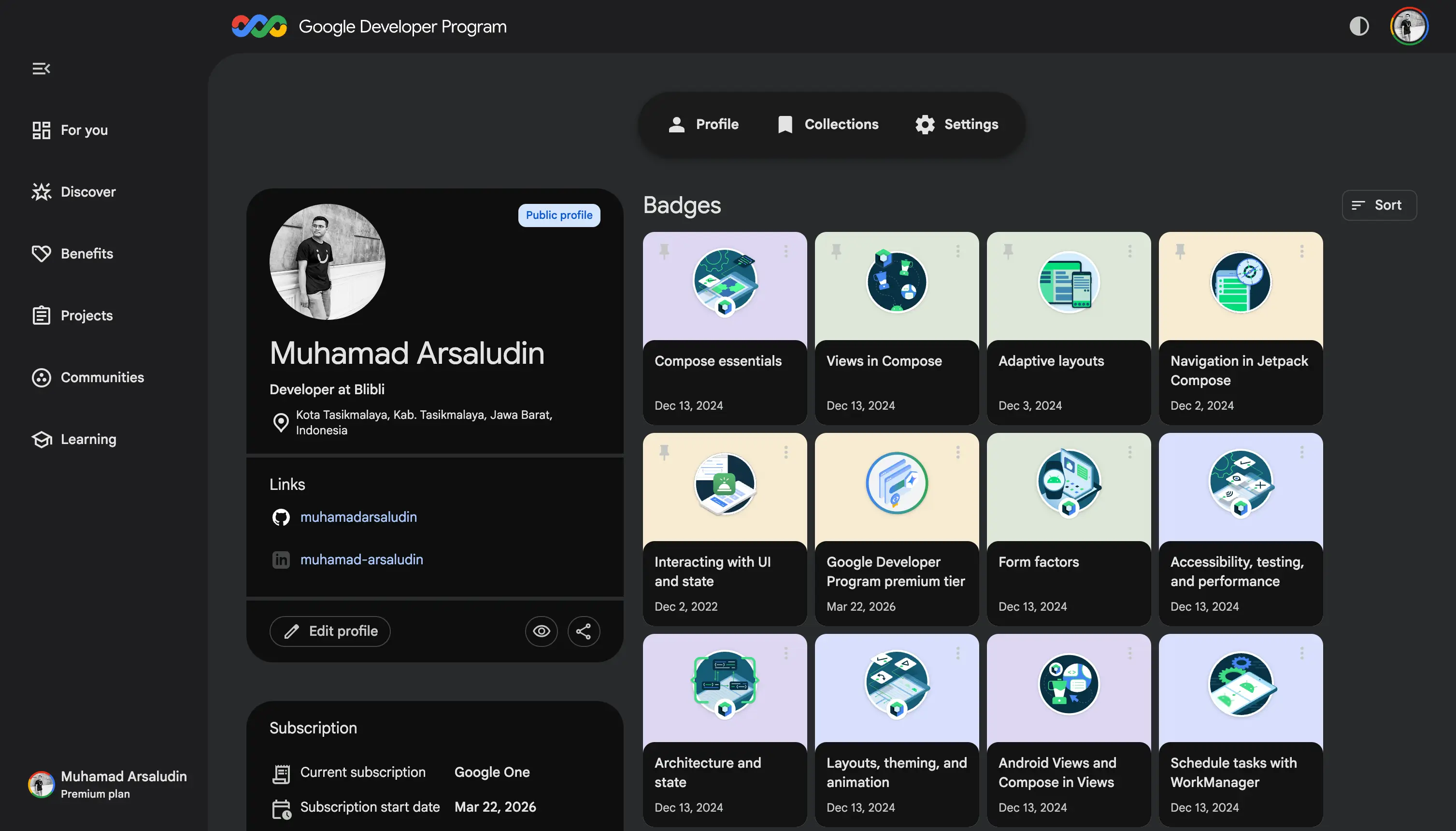
Documentation of learning progress through the official Android Developers curriculum
- Supplementing understanding through external sources such as articles, YouTube videos, and courses on platforms like Udemy and Dicoding.
- Studying Material Design to understand the component system, theming, and interaction patterns in the Android ecosystem.
- Collaborating with Android Developers through internal sessions to align understanding of the codebase and technical implementation.
2. Project Kick-off and Alignment
As the initial step of the project, we held a kick-off meeting bringing together all key stakeholders, from PICs to managers from the UX Engineer, Designer, and Android Developer teams. This meeting became a crucial starting point to align the intent, goals, and urgency of the BLUE Android Design System project so that all stakeholders shared the same understanding and vision.
This discussion resulted in several key agreements:
- Establishing project ownership as a shared project with a centralized with contribution model, where the UX Engineer team acts as the main manager, while Android Developers actively contribute to the implementation and development of the design system.
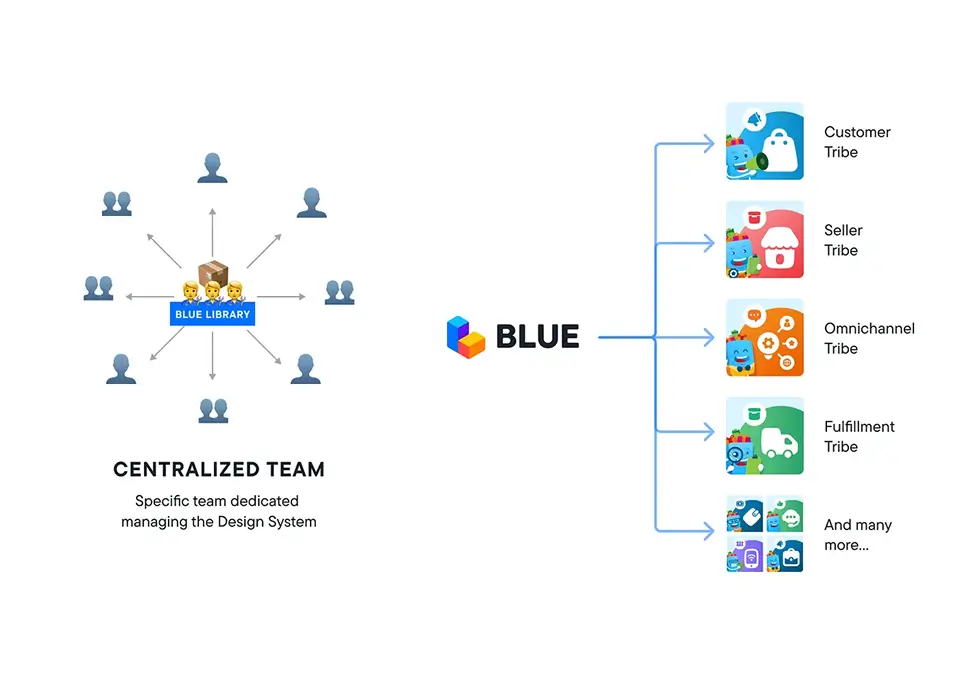
Centralized Model in BLUE Web Design System
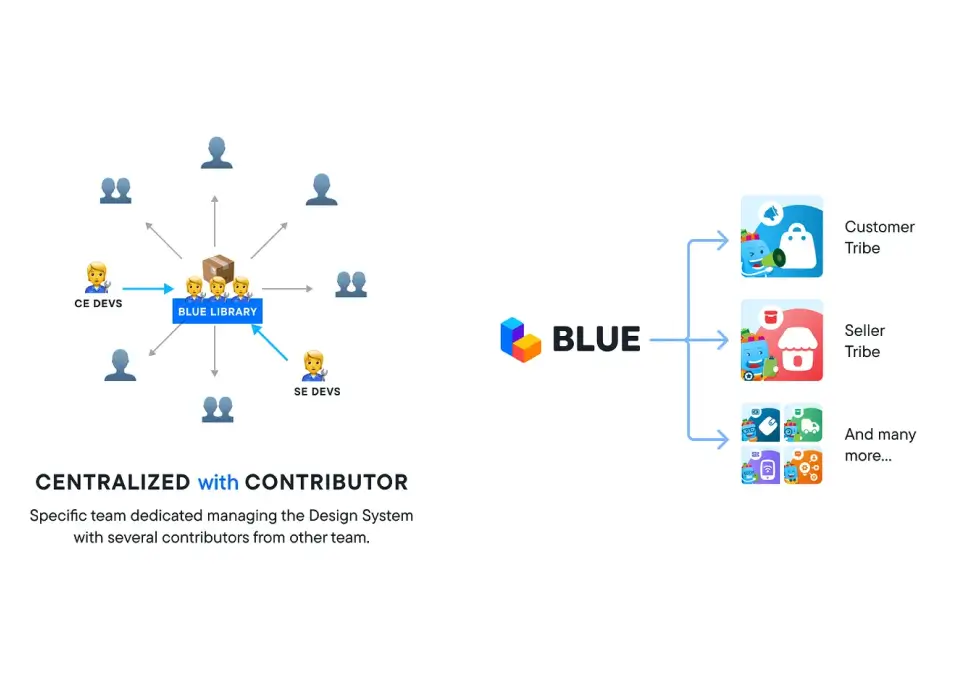
Centralized with Contribution Model in BLUE Android Design System
- Choosing Jetpack Compose as the main development foundation because it supports a modern approach and interoperability with Android View (XML) to facilitate a gradual adoption process.
- Migrating design token scripts and some component libraries already based on BLUE 3.0 and built using Jetpack Compose to a new repository under the management of the UX Engineer team.
- The development process was conducted iteratively through several sprints, with a duration initially planned for every 2 weeks, then adjusted to 1 month to accommodate cross-team processes as well as code review and Design QA cycles.
- The entire development process, whether migration or the creation of new components or features, must go through code review with approval from at least one representative from each team (UX Engineer, Android Dev CE, and Android Dev SE), and pass Design QA by a designer before being implemented.
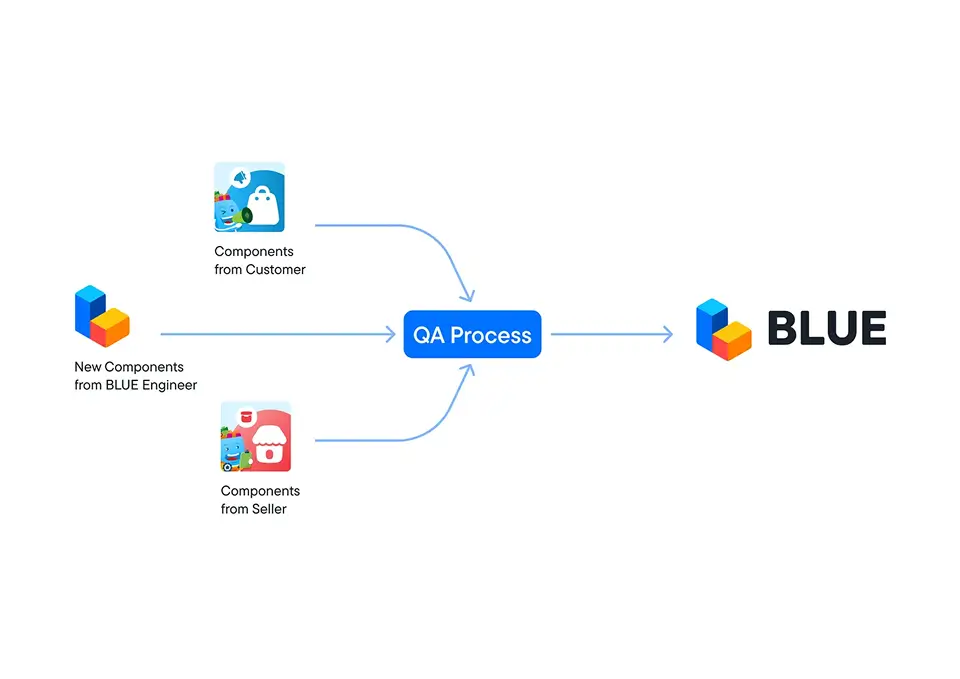
BLUE Android Design System Development Process
3. Development and Implementation
The development and implementation of the BLUE Android Design System were carried out iteratively through several sprints using a collaborative and continuous approach. The entire process ran in parallel and continuously evolved to meet the needs of each sprint.
- The initial phase focused on migrating design token scripts and the component library to the new repository as the main foundation of the design system.
- Audits were conducted on the migrated code and components to map their compliance with the BLUE design system standards and identify areas that needed to be fixed or refined.
- Improvements were made based on the audit results through token value adjustments and component refinements both visually and in the code.
- The development of new components was done iteratively to complete library needs, alongside bug fixing processes and standard adjustments.
- The team also initiated the icon library as a new icon system on the Android platform to fulfill visual asset needs that were previously unavailable.
- All development results were required to go through a cross-team code review process and design QA before being implemented into production.
- The team also built a CI/CD pipeline alongside the RnD team to automate the build and distribution process of the Android Design System library.
- The library release process was managed by the UX Engineer team via the CI/CD pipeline, with artifact distribution using Google Artifact Registry (GAR). Each release was accompanied by release notes and release announcements to help developers adopt updates more easily.
- Implementation was carried out through pilot projects on several selected projects to validate the use of the design system in a real environment.
- Each sprint concluded with a retrospective session to evaluate the workflow and improve team collaboration effectiveness.
Results
After approximately six months of development, the first version of the BLUE Android Design System was successfully released in July 2024. This release presented three main foundations in the form of Component Library, Design Tokens, and Icon Library to support the standardization of Android development in a more consistent, modular, and centralized manner for all products within the Blibli application ecosystem.
First Version Release of BLUE Android Design System in July 2024
Component Library
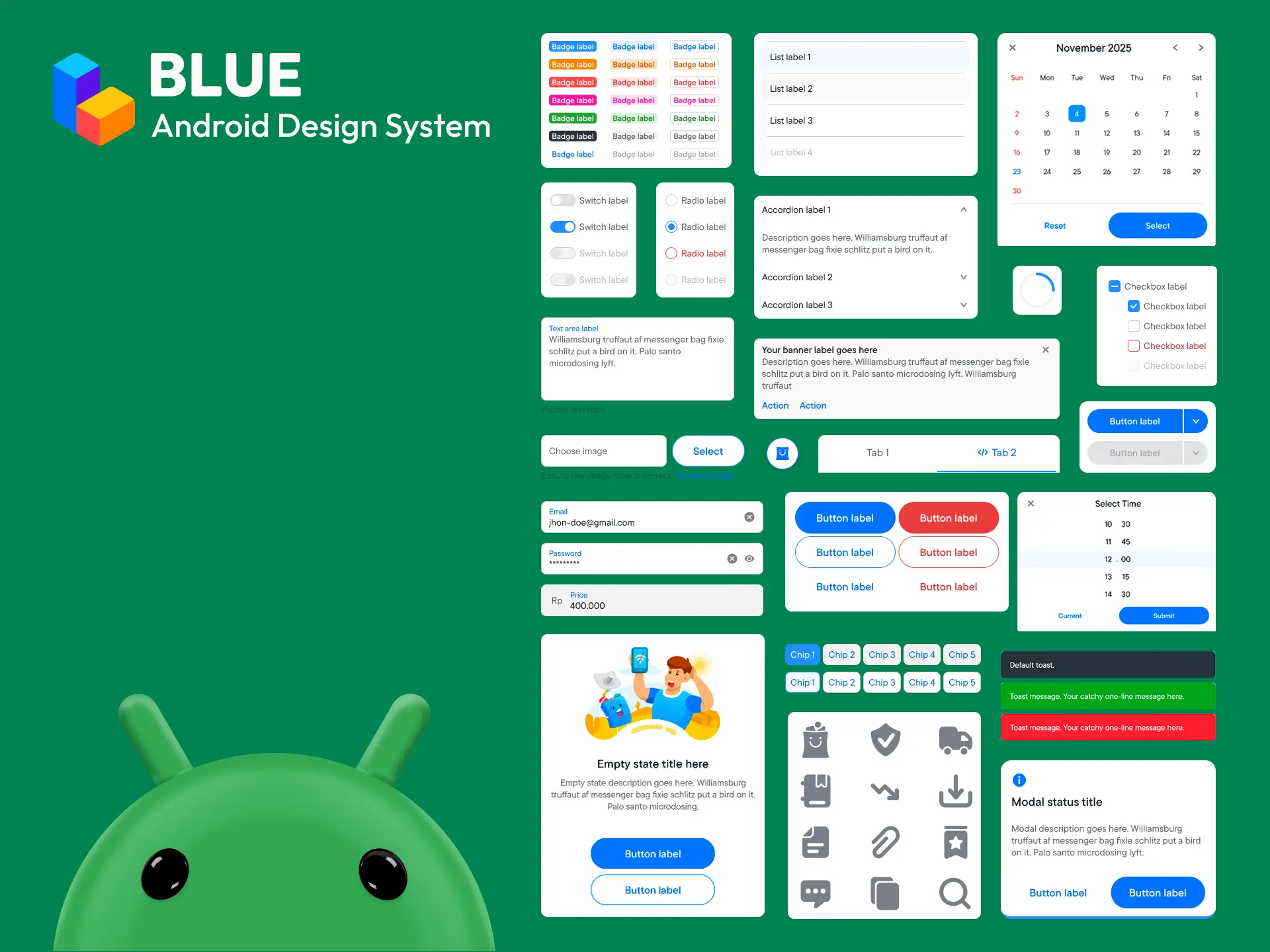
The Component Library is the main foundation containing more than 30 ready-to-use UI components based on Jetpack Compose. This library also marks an important step in modernizing the Android UI, aiming to reduce code redundancy and provide a centralized solution for all developers.
BLUE Android Design System Component Library Preview
For complete details on the component list, refer to the BLUE 3.0 documentation. It should be noted that the components in this documentation are web-based, so their implementation on Android features some adjustments due to differences in UI systems, behaviors, as well as the characteristics and limitations of each platform.
Design Tokens
Design Tokens function as the single source of truth for basic visual elements such as color, typography, sizing, spacing, and elevation. The token structure in BLUE Android adopts a tiered structure consisting of:
- Global Tokens which function to store raw values such as base colors and constant size numbers.
- Alias Tokens which provide specific meanings or functions to global values, acting as the main bridge for theming needs such as light mode and dark mode automatically.
- Component Tokens which bind specific values directly to component library elements so that global changes do not break the structure of other components.
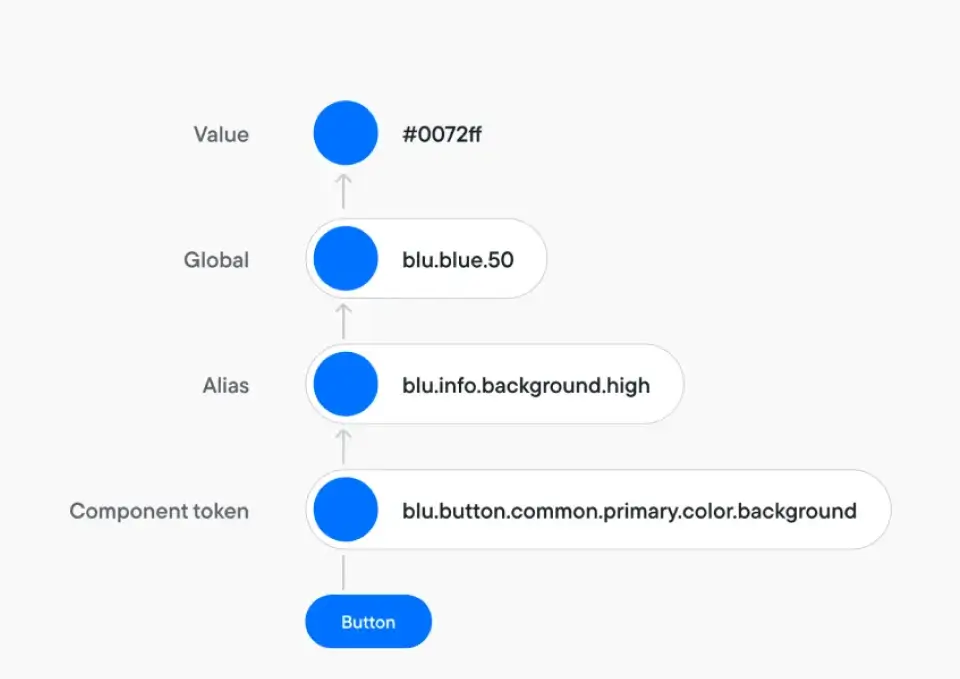
BLUE design tokens structure
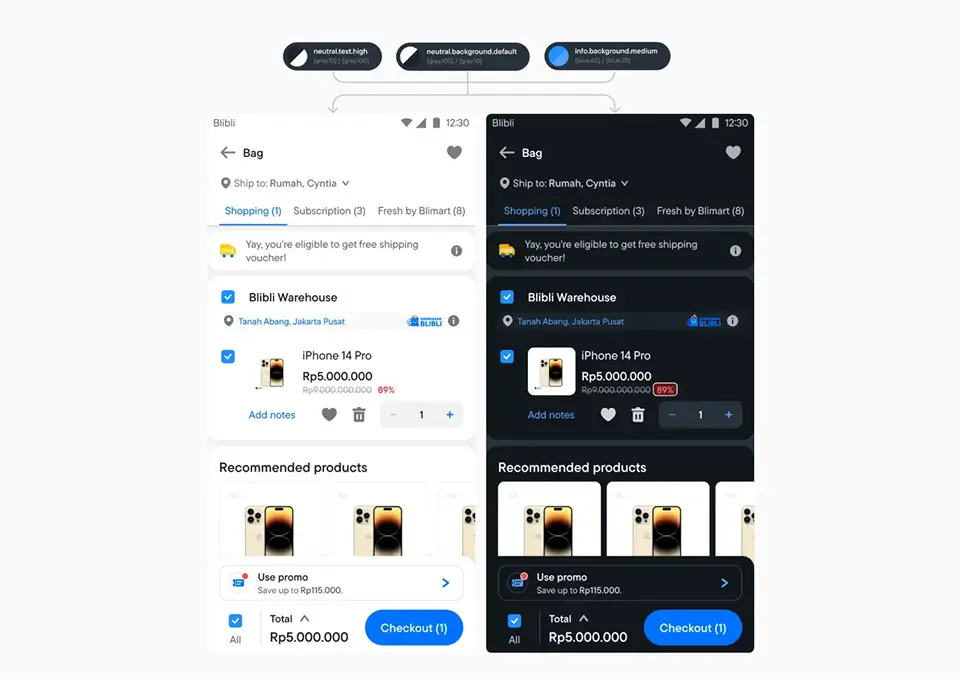
BLUE design tokens implementation
For more complete details regarding this governance guideline, please refer to the official documentation at BLUE 3.0 Design Tokens Guidelines and its mapping structure at BLUE 3.0 Alias Tokens.
Icon Library
The Icon Library is a specialized library that serves as the center for managing all icon assets modularly on the Android platform. Through this initiation, the entire iconography system is distributed through a single gateway in the form of optimized Vector Drawables integrated directly into the Jetpack Compose code.
This system facilitates the consistent use of icons by developers, eliminates the manual import process of standalone XML asset files that are prone to duplication, and significantly helps optimize the final installation file size (APK size optimization).
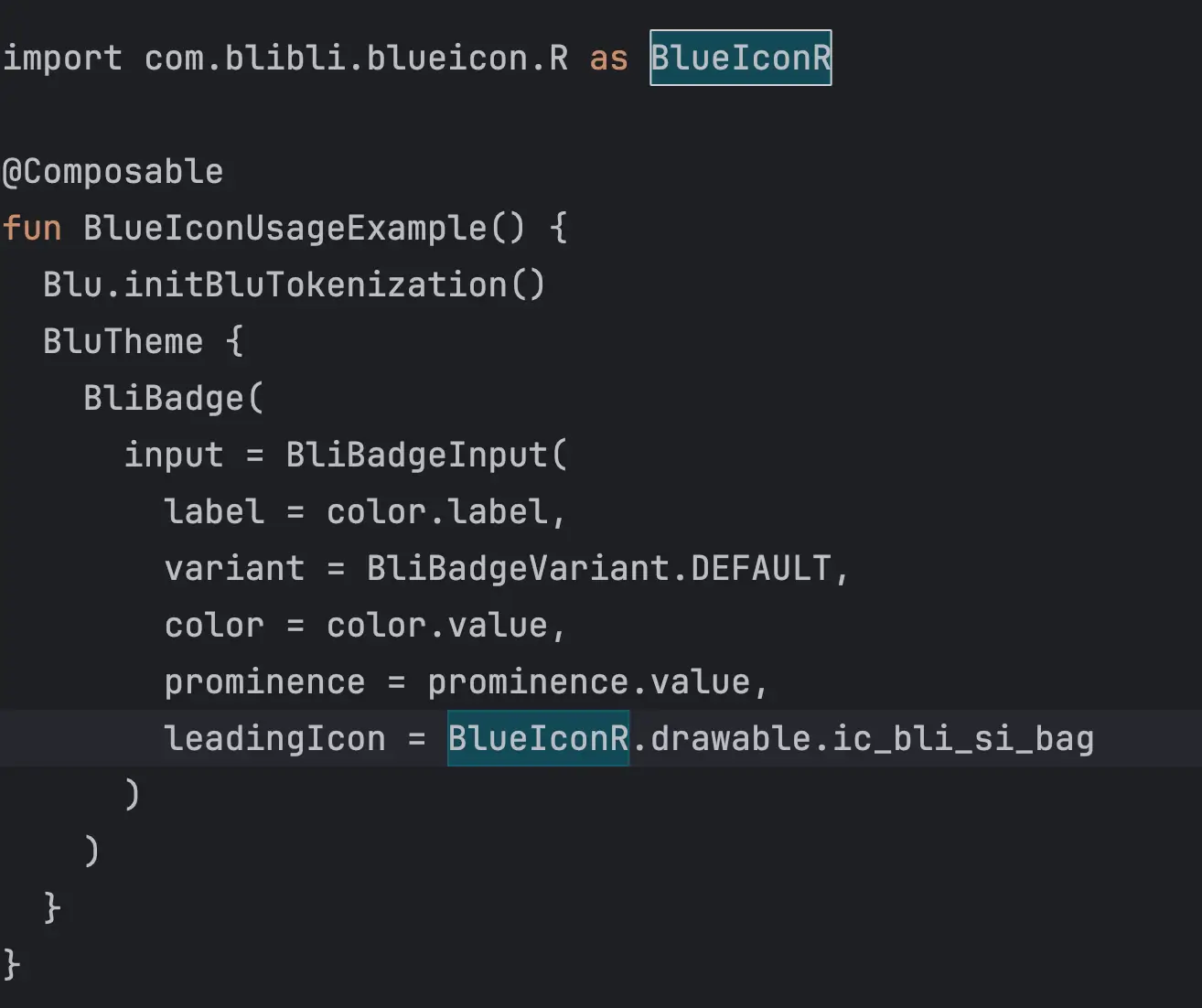
BLUE icon implementation in Android project
To find out the list of available icon categories and variations, you can check the official documentation at BLUE 3.0 Icon Library.
Impact
Impact on the Company
- Visual and product interaction consistency increased through the standardization of the BLUE Android Design System.
- The delivery process for Android features became faster through the utilization of ready-to-use components from a centralized library.
- Reduced asset duplication through the implementation of a centralized icon library, so that additional scripts to detect duplicated assets, which were previously used by Android developers, are no longer needed.
- Supported Blibli's rebranding process on the Android platform through the implementation of a more consistent and standardized design system.
- Cross-team collaboration between UX Engineers, Android CE, Android SE, and Product Designers became more focused through a standardized workflow.
- Independent repository management under the UX Engineer team helped reduce dependencies between teams and simplified UI asset maintenance in the long term.
- The library distribution process became more efficient through the implementation of CI/CD pipelines and standardized release pipelines.
Personal Impact
- Increased technical understanding regarding the implementation of design tokens and component libraries based on Jetpack Compose on the Android platform.
- Honed skills in building and managing large-scale design systems from the initiation phase to code quality standardization.
- Strengthened experience in technical governance through cross-team code reviews and design QA coordination.
- Sharpened analytical skills in conducting code audits and structural component enhancements.
- Provided new experience in managing library release processes, CI/CD pipelines, and artifact distribution to Google Artifact Registry (GAR).
Team and Appreciation
The development of this design system could not have been realized without the close collaboration of all stakeholders and contributors involved at every stage of the process.
BLUE Android and iOS stakeholders and contributors
I express my deepest appreciation and gratitude to the entire team and all parties who have contributed through their dedication, hard work, and consistent support throughout the development process. This first version release stands as a tangible result of solid and well-coordinated collaboration.